katerinach
Developer
Assigned synchr0nicity
The menu that appears when you click the three dots to view editing options for an article is cut off
The menu that appears when you click the three dots to view editing options for an article is cut off
Closed- Feature
- Articles & Templates
- Reported by
- tinkerb333
- Opened
- Assigned to
- synchr0nicity
Description
The menu that displays editing options (go to old version of the editor, view in world, move to) when you click on the ... at the top right of the article gets cut off by the new side menu.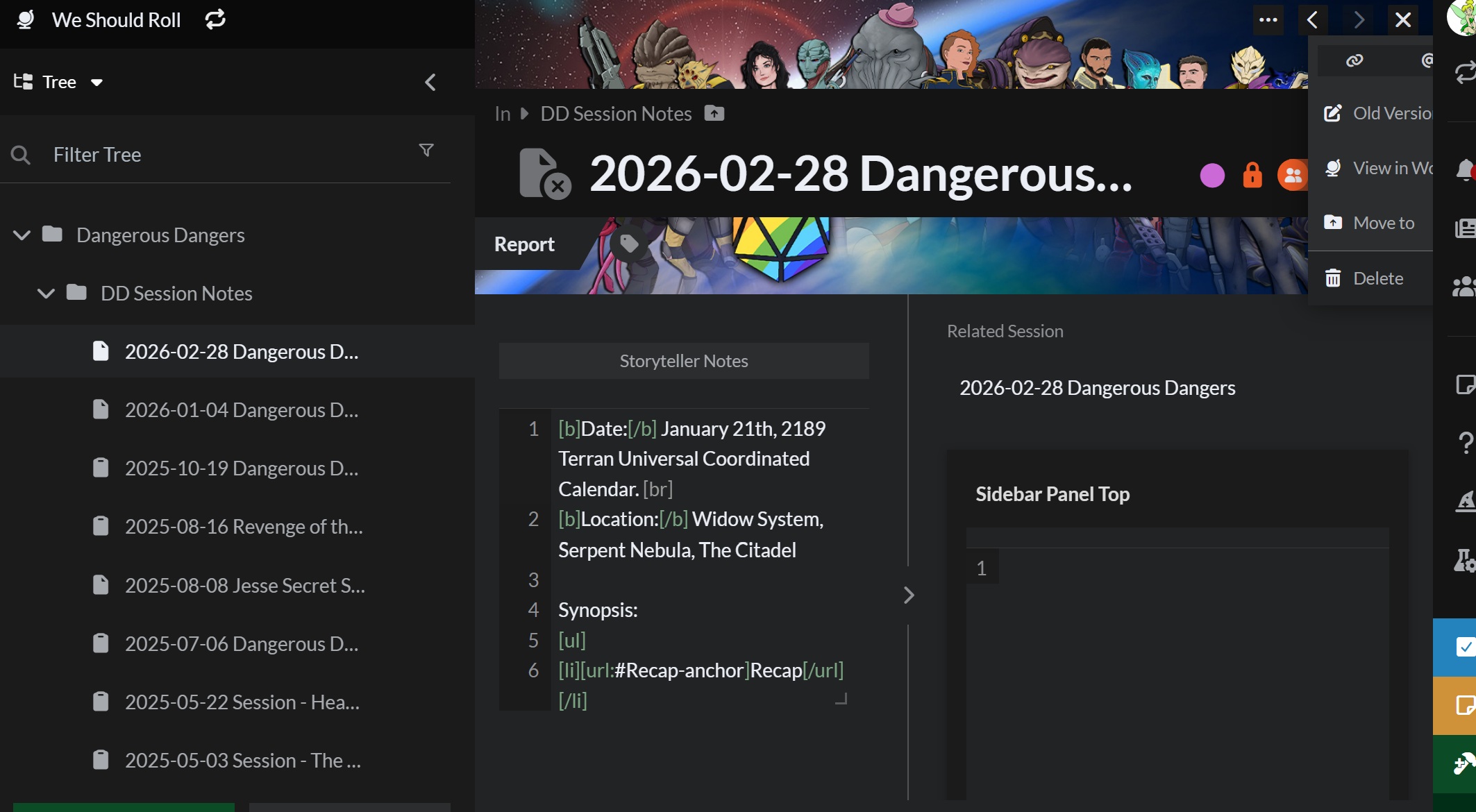
Steps to Reproduce
Click on articles & world
click the article you want to view/edit
click the ... in the uper right corner
History
Comments and updates to this report
Find your way!
Resources
WHO WE ARE
LEGAL
Listen to our Podcast




by 3 Armored Kittens · Prodromos v.1.1 - World Anvil 0.9.15.050 © 2017-2025 [en] | Anvil Time: 10:23, Oct 14 2026