katerinach
Assignee
Assigned katerinach
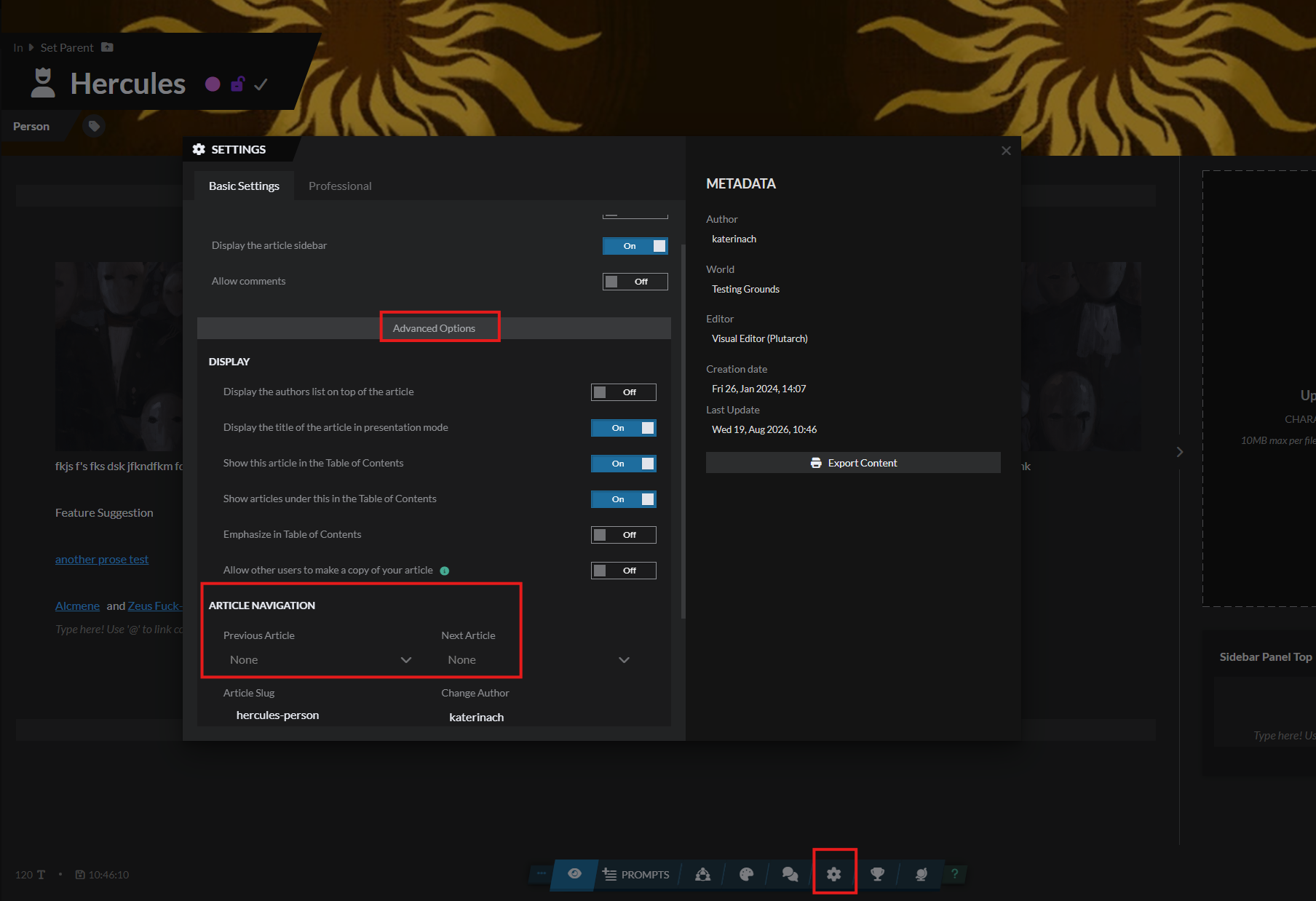
Cannot locate Linear Navigation (Previous/Next article) setting anywhere in the new Articles & World Manager editor
Cannot locate Linear Navigation (Previous/Next article) setting anywhere in the new Articles & World Manager editor
Closed- Feature
- Articles & Templates
- Reported by
- ProfPorterfield
- Opened
- Assigned to
- katerinach
Not a Bug
Description
I'm trying to set/verify the Previous and Next article links (Linear Navigation) for this article, but I can't find any control for it in the new editor.
I checked the old-style article editor (/world/article/.../edit) first — its Navigation tab only shows Parent Category, Parent Article, and Position/Weight. No Linear Navigation option appears there.
I then switched to the new Athena/Articles & World Manager editor (URL above) specifically to look for it, based on community documentation (the "Athena Transition Guide," worldanvil.com/w/rin-s-overworld-those2nerds/a/athena-transition-guide-article) which states Linear Navigation now lives under an "Advanced" section/button in the new interface. However, I cannot find any "Advanced" section or button anywhere in the new editor for this article.
Steps to Reproduce
Open the article "Fashions and Fads in the 1950s" in the new Articles & World Manager editor
Look for a way to set the Previous/Next article (Linear Navigation)
No such option is visible anywhere in the interface, including under any "Advanced" menu or button
History
Comments and updates to this report
katerinach
Assignee
katerinach
Assignee
Added tag
Not a Bug
katerinach
Assignee
set this bug to closed
Find your way!
Resources
WHO WE ARE
LEGAL
Listen to our Podcast




by 3 Armored Kittens · Prodromos v.1.1 - World Anvil 0.9.15.050 © 2017-2025 [en] | Anvil Time: 10:24, Oct 14 2026